Handling Ticker & Symbol Changes
Last updated on August 14, 2025
From time to time, a company may change its ticker symbol. This is often due to a rebranding or a change in the company's name. A well-known example is when Facebook, Inc. changed its name to Meta Platforms, Inc., and its ticker symbol changed from FB to META.
Is a Ticker Change a Taxable Event?
No. A simple change of a company's name and ticker symbol is purely administrative and is not a Capital Gains Tax (CGT) event. You are not disposing of your shares; they are simply being relabelled. Your original purchase date and cost base remain the same.
How to Record a Ticker Change in taxtallee
It's important to update the ticker in taxtallee to ensure that future data, like prices and dividends, syncs correctly. We provide a simple tool to handle this.
- Navigate to the page of the holding with the old ticker symbol.
- Click on the Settings tab.
- In the "Rename Ticker/Symbol" section, click the Rename Ticker button.
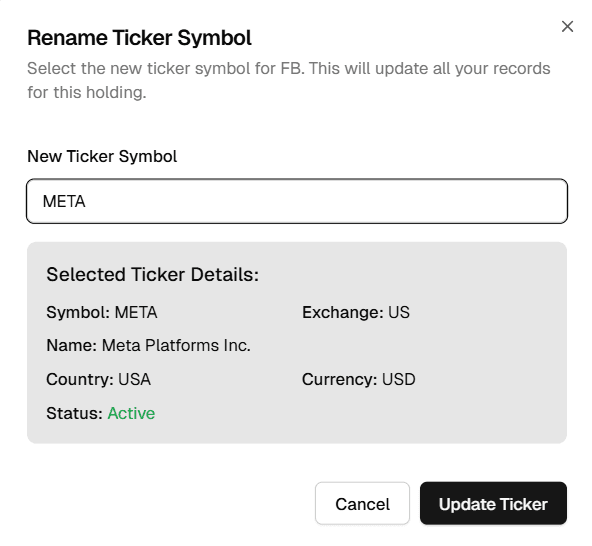
- In the pop-up that appears, search for and select the new ticker symbol. Ensure you select the correct stock on the correct exchange.
- Review the details of the new ticker to confirm it's the right one.
- Click Update Ticker.
What Happens Next?
Once you confirm the change, taxtallee will perform a comprehensive update in the background. It will go through your entire history for that holding and update the old ticker to the new one across all associated records, including:
- Transactions (Buys, Sells)
- Dividends and Distributions
- Corporate Actions
This ensures your historical data remains intact and consistent, and all future data will be correctly linked to the new ticker symbol.