Quantity Adjustments (Splits, Bonuses, Consolidations)
Last updated on August 14, 2025
Quantity adjustments are corporate actions that change the number of shares you hold in a company. While no cash is exchanged, these events are crucial to record accurately as they directly impact the cost base per share, which is essential for correct Capital Gains Tax (CGT) calculations when you eventually sell.
Types of Quantity Adjustments
Stock Split
A company increases the number of its shares by a certain ratio. This is usually done to make the share price more accessible to a wider range of investors. Your total investment value remains the same, but it's now spread across more shares, lowering the cost base of each share.
Example: You own 100 shares of Company A with a total cost base of $1,000 ($10 per share). Company A announces a 2-for-1 split. You will now own 200 shares, and your cost base per share is now $5 ($1,000 / 200 shares).
Consolidation (Reverse Stock Split)
This is the opposite of a split. A company reduces the number of its shares to increase the share price. Your total investment value remains the same, but it's now concentrated in fewer shares, raising the cost base of each share.
Example: You own 1,000 shares of Company B with a total cost base of $1,000 ($1 per share). Company B announces a 1-for-10 consolidation. You will now own 100 shares, and your cost base per share is now $10 ($1,000 / 100 shares).
Bonus Issue
A company gives existing shareholders extra shares for free, based on the number of shares they already own. Similar to a split, this dilutes the cost base per share as your original investment cost is now spread across more shares.
Example: You own 500 shares of Company C with a total cost base of $5,000 ($10 per share). Company C announces a 1-for-5 bonus issue. You receive 100 bonus shares (500 / 5). You now own 600 shares, and your cost base per share is now $8.33 ($5,000 / 600 shares).
How to Record Quantity Adjustments
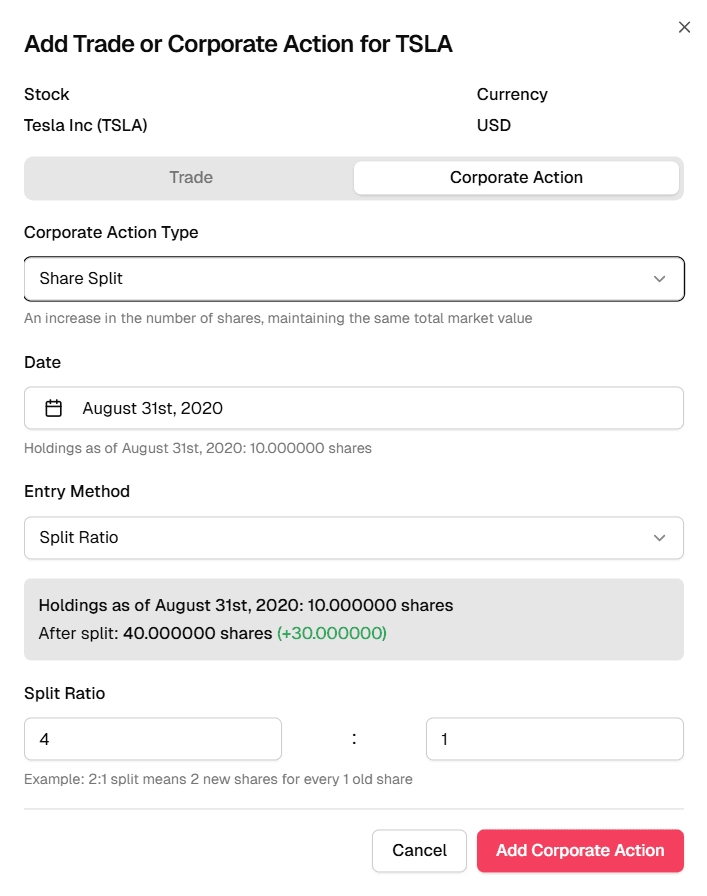
Taxtallee automatically syncs data for known stock splits on listed securities and creates an unconfirmed corporate action for you. You can find these in your transaction list. It is crucial that you verify these details.
To add an adjustment manually:
- Click the Add Entry button and select Add Corporate Action.
- Select the appropriate action type (Share Split, Bonus Shares, or Consolidation).
- Enter the Date of the event.
- Choose your entry method: either by Ratio (e.g., 2 for 1) or by the total number of Additional/Subtracted Shares.
Always verify the details of a corporate action from official sources, such as the company's announcements on the ASX website or your share registrar statements.