Understanding AMIT Annual Tax Statements
Last updated on August 12, 2025
Disclaimer: Taxtallee is not a financial product advisory service and does not provide financial advice. All information available through Taxtallee is purely numerical in nature and is based on a combination of publicly available data, user-provided inputs, and other accessible data sources. Any reports or outputs generated by Taxtallee are the result of our internal performance methodologies and standard calculation practices. This information does not constitute financial advice, recommendations, or professional opinions. If you have questions regarding how to complete your tax forms we recommend that you obtain independent financial/tax advice from a qualified professional.
Distributions from Exchange Traded Funds (ETFs) and Managed Funds are more complex than standard company dividends. These funds are typically structured as trusts, and for tax purposes, they "pass through" various types of income and tax components to you, the unitholder.
You will receive an AMIT (Attribution Managed Investment Trust) Annual Tax Statement from the fund's share registrar, which provides the final, definitive breakdown of these components for the financial year. These statements are usually available from late July to September.
How to Enter Your AMIT Statement
Taxtallee provides a dedicated tool to make entering this complex data simple.
- Navigate to the Reports page from the sidebar.
- Under the "Taxable Income" tab, find the "Local Income - Australia (From Trust Income)" table.
- For the relevant ETF, click the button that says Enter Your AMIT Annual Tax Statement Summary.
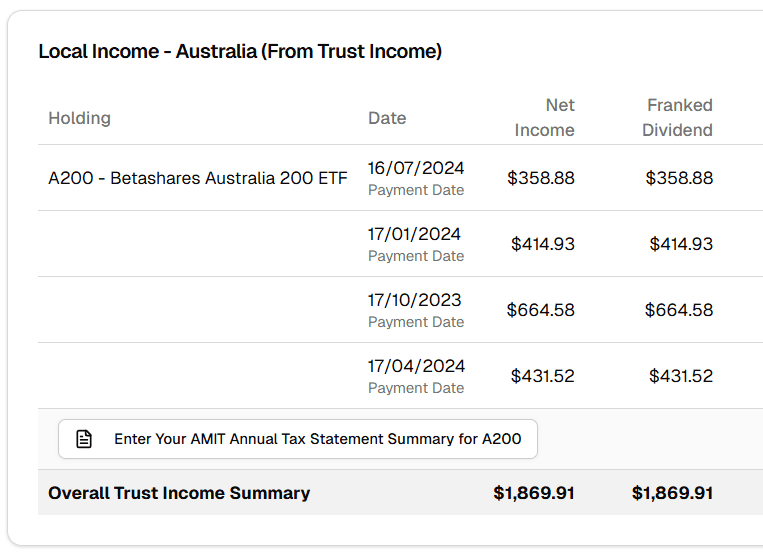
The Annual Tax Statement Modal
This modal is designed to mirror the summary section of your AMIT statement. The workflow is simple:
Enter the total summary values from your statement into the "Summary Total" column. Taxtallee will then automatically and proportionally distribute these totals across all the distributions you received from that ETF during the tax year.
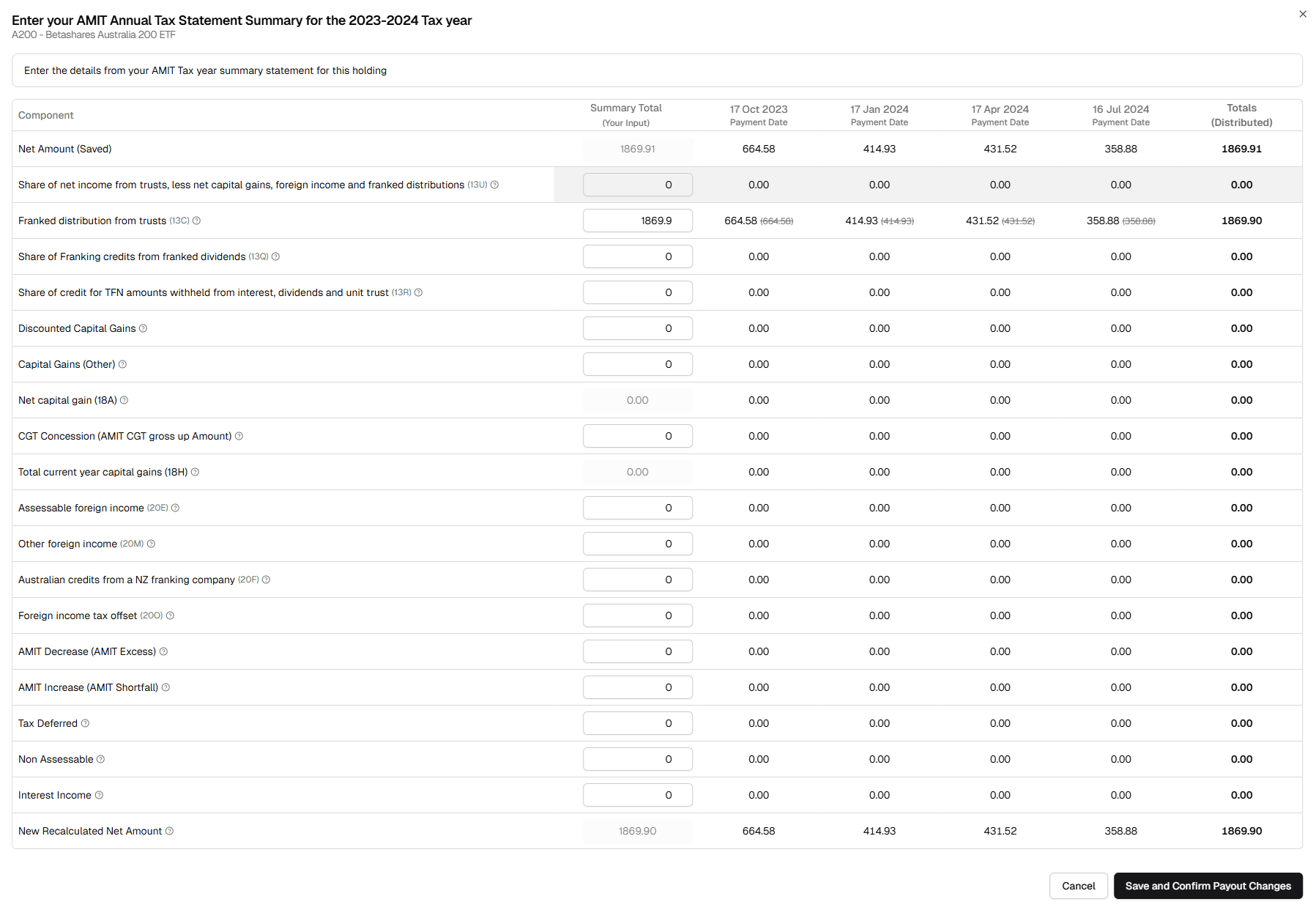
Key Components Explained
While there are many fields, here are some of the most common components you'll find on your statement and in our modal. The ATO codes are provided to help you match them up.
- Franked/Unfranked Amounts (13C/13U): The dividend portions of the distribution.
- Franking Credits (13Q): Credits attached to the franked portion.
- Capital Gains (18H/18A): The fund's capital gains passed on to you. These are automatically factored into your CGT calculations.
- Foreign Income & Tax Credits (20E/20O): Income sourced from outside Australia and any foreign tax paid.
- AMIT Cost Base Net Change: A crucial non-cash component that adjusts the cost base of your units. A decrease (excess) reduces your cost base, while an increase (shortfall) increases it. This is vital for correct CGT calculations when you eventually sell your units.
Finalizing and Confirming
After entering all the summary values, review the distributed amounts in the table. If they look correct, click Save and Confirm Payout Changes. This action will:
- Overwrite the financial components of all underlying distribution records for that ETF for the year.
- Mark all those distributions as "Confirmed".
Your taxable income report will now be updated with the precise, final tax components from your official AMIT statement.