Handling Dividend Reinvestment Plans (DRP)
Last updated on August 12, 2025
A Dividend Reinvestment Plan (DRP or DRIP) is an option offered by some companies that allows you to use your dividend payments to automatically buy more shares in the company, often at a discount and without brokerage fees.
How to Record a DRP in taxtallee
When you add or edit a local dividend, you can record a DRP by checking the Dividend Reinvestment Plan (DRP) box. This will reveal the DRP-specific fields.
- 1. Ensure the net amount of the dividend or distribution matches your records before proceeding
- 2. Select the Dividend Reinvestment Plan checkbox
- 3. Enter in the share price of the shares recieved under the dividend reinvestment plan
- 4. If you had cash amount left over. This may be available to use in your next DRP.
- 5. Review the total shares recieved matches your records
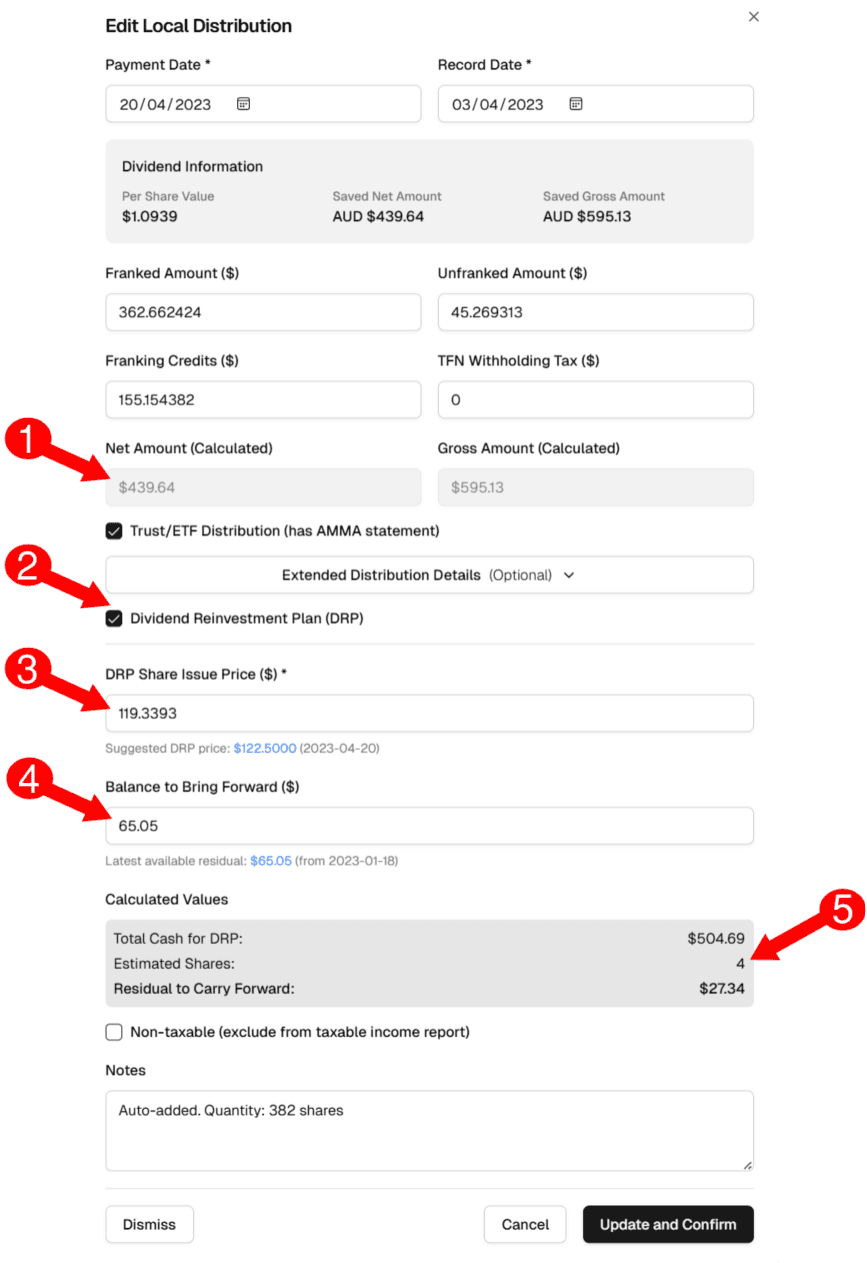
DRP Form Fields Explained
- DRP Share Issue Price: This is the price per share at which the new shares were issued to you. You can find this on your DRP statement. Taxtallee will suggest a price based on the stock's closing price on the payment date, but you should always use the official price from your statement.
- Balance to Bring Forward: If you had a small amount of cash left over from a previous DRP (not enough to buy a full share), you can enter that amount here. Taxtallee will automatically find the most recent residual balance for the holding and suggest it for you.
- Calculated Values (Read-Only):
- Total Cash for DRP: The sum of the current dividend's net amount and any balance brought forward.
- Estimated Shares: The number of whole shares that can be purchased with the total cash.
- Residual to Carry Forward: The small cash amount left over after purchasing the whole shares. This will be available to use in your next DRP.
How DRP Affects Your Portfolio
When you save a dividend with DRP enabled, taxtallee automatically performs two key actions:
- Records the Income: The dividend is recorded as income for tax purposes, just like a cash dividend.
- Creates a 'Buy' Transaction: A new "Buy" transaction is automatically created in your transaction list for the new shares you acquired. The purchase price is the DRP issue price, and the date is the dividend payment date.
This ensures your holding quantity is updated correctly and that the cost base of your new shares is accurately recorded for future Capital Gains Tax (CGT) calculations.